
Tech
How Does a Robot Vacuum Work? Explained in Simple Terms

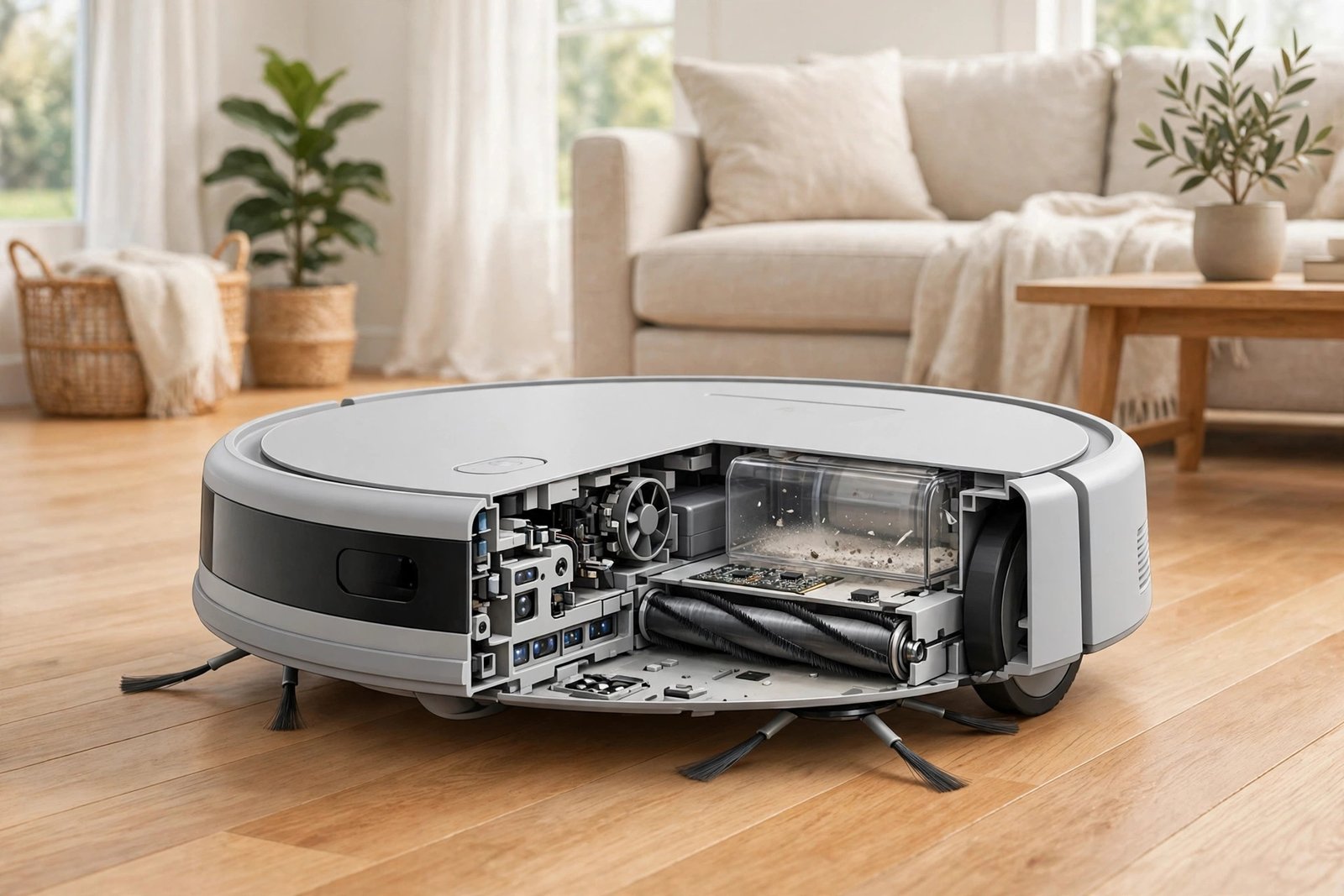
A robot vacuum works by doing three jobs at the same time: it finds its way around your home, it picks up dirt, and it keeps itself charged. Under the shell, a small computer, a ring of sensors, brushes, a suction motor, and a rechargeable battery work together — so you can press a button, walk away, and come back to clean floors.
If you are still deciding what one is, read our guide to what a robot vacuum is first. This article explains what happens inside the machine once it starts cleaning.
A Cleaning Run, Step by Step
Here is what a typical robot vacuum does from the moment you start it:
- It leaves the dock. The vacuum rolls off its charging station and starts its cleaning cycle.
- It works out where it is. Depending on the model, it either starts moving and reacts to what it bumps into, or it scans the room and builds a map first.
- It cleans in a pattern. Side brushes sweep dirt from edges and corners toward the middle, a main brush lifts it off the floor, and suction pulls it into the dustbin.
- It avoids trouble. Sensors watch for stairs, walls, furniture legs, and cables, and steer the vacuum around them.
- It goes home. When the battery runs low or the job is done, it drives itself back to the dock to recharge. Smarter models remember where they stopped and pick up cleaning from the same spot after charging.
- It empties itself — sometimes. On models with a self-emptying dock, the base sucks the dirt out of the robot’s small bin into a much bigger bag or container.
That is the whole job, but each step has its own clever engineering. Let us look at them one by one.
How It Finds Its Way Around
Navigation is the biggest difference between a cheap robot vacuum and a good one. There are four main ways a robot vacuum moves around your home, from the simplest to the smartest.
1. Random navigation (bump and go)
The cheapest models move in a simple pattern: drive straight until they hit something, then turn and go another way. They also follow walls and edges to catch dirt along skirting boards. It works, and with enough time they cover most of a room, but they are slow and can miss spots. This is fine for a small apartment or a single room, but not for a whole house.
2. Gyroscope navigation
A step up from random models, these vacuums use a gyroscope — a small sensor that tracks direction and distance — to clean in rough straight lines instead of bouncing around. They do not build a real map of your home, but they cover the floor more evenly and finish faster than bump-and-go models.
3. Camera navigation
Some mid-range models use a camera on top to look at the ceiling and landmarks in the room, and work out where they are from that. It is a big improvement over random cleaning, but it needs some light to work well, so it can struggle in a dark room.
4. LiDAR mapping
The smartest robot vacuums use LiDAR, which stands for Light Detection and Ranging. A small laser on top spins around and fires rapid pulses of light, timing how long each pulse takes to bounce back. From that, the vacuum builds an accurate floor plan of your home — even in the dark.
With a map, the vacuum cleans in neat, straight lines, knows which rooms it has finished, and lets you tell it to clean only the kitchen or stay out of the kids’ room from the app. It can also store maps for more than one floor.
| Navigation type | How it works | Best for |
|---|---|---|
| Random (bump and go) | Drives until it hits something, then turns | Small flats, single rooms, tight budgets |
| Gyroscope | Tracks direction to clean in rough straight lines | Small to medium homes on a budget |
| Camera | Uses a camera to work out its position | Medium homes with good lighting |
| LiDAR | Laser scans the room and builds an accurate map | Medium and large homes, pet owners, anyone who wants room-by-room control |
How It Actually Picks Up Dirt
Navigation decides where the robot goes. The cleaning system decides what it actually picks up. Most robot vacuums use the same three-part setup:
Side brushes. One or two small spinning brushes stick out from the sides. They reach into corners and along edges, and flick dust and crumbs into the main cleaning path. This matters because a round robot cannot fit into a square corner.
Main brush. Underneath, a roller brush spins and agitates the floor, lifting dirt and hair out of cracks and low-pile carpet. Some models use a rubber roller instead of bristles, which tangles less with long hair and pet hair.
Suction motor and dustbin. Behind the brush, a small motor and fan create airflow that pulls the dirt into an onboard dustbin. Suction power is usually listed in Pascals (Pa). Most decent models offer 1,500 to 2,500 Pa or more, and premium models advertise 6,000 Pa or higher. But the number alone does not tell the whole story — the brush design and airflow matter just as much, and a higher Pa figure does not always mean cleaner floors.
Most models also have a filter in the dustbin that traps fine dust before the air is blown back out. If allergies are a concern, look for one with a HEPA filter, which is rated to trap 99.97% of particles as small as 0.3 microns, including pollen and pet dander.
The Sensors That Keep It Safe
A robot vacuum is covered in sensors, and each one does a different job:
- Bump sensors — tell it when it has touched something, like a chair leg, so it can turn away.
- Cliff sensors — underneath the machine, they watch for drops like stair edges and stop the vacuum from driving off.
- Infrared and ultrasonic sensors — measure the distance to walls and furniture, so the vacuum can slow down before it hits anything.
- Wall sensors — keep it hugging the wall so it can clean along edges and skirting boards.
- Dirt sensors — on some models, these detect a dirtier patch of floor and make the vacuum slow down and clean that spot more thoroughly.
- Wheel sensors — track how far the wheels have turned, which helps the vacuum estimate where it is.
High-end models add obstacle recognition: a camera or laser that can spot shoes, cables, socks, and pet bowls, and steer around them. But even the best systems are not perfect — they can still miss small or dark objects, and they cannot tell a phone charger from a shoelace every time.
How It Charges Itself and Resumes
Robot vacuums run on rechargeable lithium-ion batteries. Most run for 60 to 180 minutes on one charge, depending on the model and the suction setting — higher suction drains the battery faster.
When the battery gets low, the vacuum stops cleaning and drives itself back to the dock, using its map or sensors to find it. The dock needs a bit of clear space around it to work — if you move the dock mid-clean, some models struggle to find it again.
On smarter models, charging is not the end of the job. After recharging, the vacuum goes back to the exact spot where it stopped and finishes the rooms it had left. Cheaper models without mapping simply start over.
On self-emptying models, the dock does more than charge. When the robot returns, the base sucks the dirt out of its small bin into a much bigger bag or container in the dock. You only need to empty that every few weeks — some docks hold up to 60 days of dirt. You still have to clean the brushes and filters yourself, though. No dock does all the maintenance.
What About Robot Vacuums That Also Mop?
Many models are vacuum-and-mop combos. They work the same way as a regular robot vacuum, but add a water tank and a mop pad underneath. As the robot drives over hard floors, it drags a damp pad behind it to wipe up fine dust and light marks.
Some newer models lift the mop pad when they roll onto carpet, so they do not wet the rug, and some wash their own pads at the dock. But a robot mop is a light wipe, not a deep scrub — it will not remove dried-on stains or handle a big spill. Think of it as a bonus for hard floors, not a replacement for a real mop.
What a Robot Vacuum Can’t Do
Understanding the limits is just as useful as knowing how it works:
- It cannot do stairs. It cleans one floor at a time, and you have to carry it upstairs yourself.
- It cannot deep-clean thick carpet. Its small motor is no match for a full-size vacuum on deep-pile rugs.
- It cannot handle big messes. Large spills, wet mud, or a knocked-over plant need a regular vacuum or mop.
- It gets stuck on clutter. Loose cables, socks, and small toys can trap it or tangle in the brushes.
- It does not clean everywhere. Tight corners, under low furniture it cannot fit beneath, and behind closed doors are all out of reach.
- It needs you sometimes. A full dustbin, a blocked intake, or a clogged filter will cut cleaning power fast, even if the navigation is working fine.
How to Help It Work Better
A robot vacuum works best in a home that is ready for it. A few small habits make a big difference:
- Tidy the floor first. Pick up cables, socks, and small toys before a run. It takes two minutes and saves the vacuum from getting stuck.
- Give the dock space. Leave clear space on both sides of the dock and in front of it, as the manual describes, so the vacuum can find its way home.
- Empty the bin regularly. Empty the dustbin after every run, or let the self-emptying dock do it. A full bin means weak suction.
- Clean the brushes weekly. Pull hair and string off the main brush and side brushes so they can spin freely.
- Wipe the sensors. A quick wipe with a dry cloth keeps cliff and camera sensors working properly. Do not tape over sensors to make the robot cross a dark rug — it needs them to stay safe.
- Keep the filter clean. Tap the filter clean or replace it every two to three months, following the manual for your model. Some filters can be washed, others cannot — check before you rinse one.
Frequently Asked Questions
Do robot vacuums work without Wi-Fi?
Yes, for basic cleaning. Most models start with a button on top and will clean without any connection. But you need Wi-Fi — usually the 2.4 GHz band — for app control, scheduling, maps, and voice commands with Alexa or Google Assistant.
Can a robot vacuum fall down the stairs?
No. Cliff sensors underneath detect drops and stop the vacuum from driving off an edge. It will turn around instead.
Do robot vacuums work on carpet?
Yes, on low-pile and medium-pile carpet. They struggle on thick, deep-pile carpet, where their suction is not strong enough to pull dirt out from deep in the fibers.
How long does a robot vacuum run on one charge?
Most run for 60 to 180 minutes, depending on the model and suction setting. Mapping models that recharge and resume can cover a large home in more than one charge.
Why does my robot vacuum keep getting stuck?
Usually it is clutter: cables, socks, rug tassels, or low furniture it tries to squeeze under. Clear the floor before a run, and check whether a full bin or tangled brush is slowing it down.
Is a higher suction number always better?
No. Brush design, airflow, and how well the vacuum navigates matter just as much. A model with a lower Pa figure but good navigation and a well-designed cleaning head can clean better than a stronger model that misses half the room.
Can a robot vacuum replace my normal vacuum?
Not completely. It is best for daily upkeep on floors you walk on every day. You will still want a full-size vacuum for deep cleaning, stairs, upholstery, and thick carpets.








What Are IGF Games? The Independent Games Festival Explained

How Does a Robot Vacuum Work? Explained in Simple Terms

Who Is Cooper Flagg? The Mavericks’ Young Star Explained

Empower Your SEO and Design with Seotoolsgroupbuy.us’ Designer Plan

Twstalker Twitter Web Viewer: Guide to Anonymous Twitter Browsing
